Your Agents. Our Governance.
Zero Changes Required.
Axis is a governance-first orchestration platform that wraps your existing AI agents with mandatory compliance, immutable audit trails, and full operational telemetry, without requiring you to modify a single line of agent code.
The Trust Tax on Enterprise AI
Organizations are deploying AI agents across critical workflows: document processing, compliance checks, data analysis, customer interactions. But every agent deployment creates the same set of questions:
What did the agent actually do? Did it have the right prompt and what was the immediate output?
Was sensitive data protected? Did PII get scanned before the agent touched it?
Can we prove it to a regulator? Not with logs. With cryptographically verifiable evidence.
What happens when an agent fails? Does the transaction disappear, or is it safely preserved for review?
Today, answering these questions requires building custom compliance tooling around every agent. That is the trust tax, and it consumes 40-60% of enterprise AI budgets.
Axis eliminates the trust tax by making governance automatic, mandatory, and provable.
Three Mandatory Interceptors
Your agents do not change. Your application sends requests to Axis instead of directly to agents. Every request and response passes through three governance interceptors, no exceptions.
PII Scanning
Before any agent sees your data, Axis scans for personally identifiable information. Social Security numbers, names, email addresses, phone numbers, and mailing addresses are detected and scrubbed. If PII cannot be safely handled, the request is parked for human review rather than proceeding with exposed data.
Immutable Audit Trail
Every step of every orchestration is recorded: which agent ran, what data it received (hashed), what it returned (hashed), how long it took, what model it used, how many tokens it consumed. When the orchestration completes, the entire audit record is sealed and anchored to IPFS, making it tamper-proof and regulator-ready.
LLM Telemetry
Every LLM call is tracked: token counts, model versions, prompt hashes, costs, latency. This is verified telemetry captured by Axis's governance layer; not estimates, not sampling.
Bring Your Own Agents
Axis is designed to work with the agents you already have or the ones you are building. You are not locked into our agent ecosystem. You bring the intelligence; we provide the governance.
Register agents using industry-standard protocols. Axis wraps each one with the same mandatory governance layer regardless of provider, framework, or hosting model.
Agent Discovery: MCP, A2A, and Skan AOW
Axis does not just call agents. It discovers them, using the protocols the industry is converging on. These three protocols work together:
The discovery layer. A standardized vocabulary for intents, skills, policies, and outcomes. When a pipeline specifies a capability without naming a specific agent, Axis queries AOW-compatible registries for agents that match.
Rich metadata via Agent Cards at /.well-known/agent.json: provider, version, documentation, skills, and input/output modes. When an A2A agent registers, the health check fetches the Agent Card. This metadata enriches the Agent Registry automatically.
The primary protocol for tool invocation. Your MCP agents expose tools via JSON-RPC 2.0. Axis calls them directly. MCP provides sparse metadata, so Axis supplements it from the Agent Registry when needed.
An agent discovered at runtime via AOW passes through the exact same governance interceptors as a pre-registered internal agent. Governance is inescapable by design.
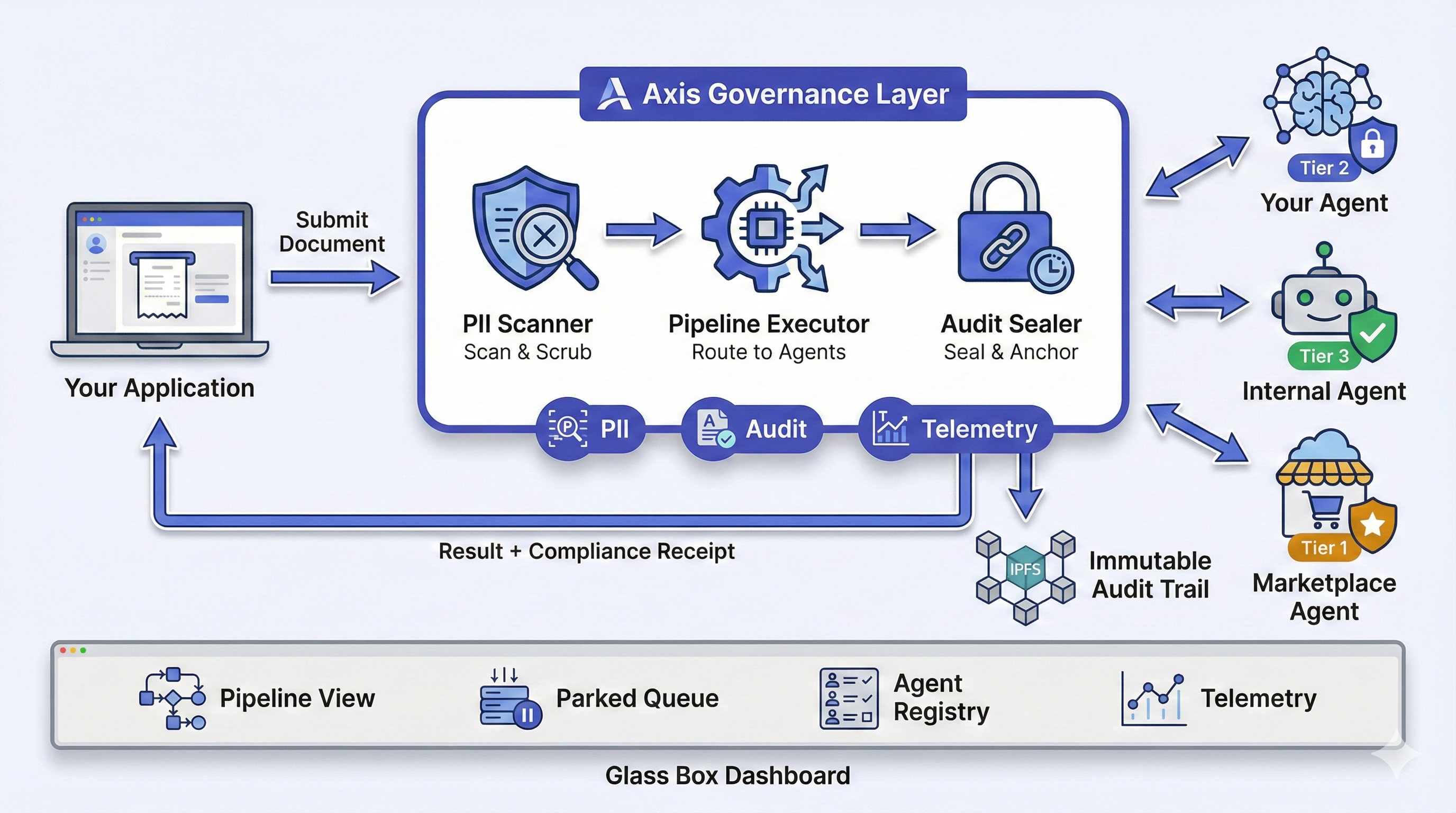
Figure 1: Axis Happy Path - From Document Submission to Compliance Receipt
Choose Your Level of Visibility
Not all agents provide the same level of instrumentation. Axis accounts for this with three governance tiers that determine how much telemetry Axis can verify.
Opaque
Default for External Agents
Axis captures envelope telemetry only: timing, payload hashes, success or failure. Your agent operates as a black box. Axis records what went in and what came out, but does not see inside the agent's processing.
Cooperative
Self-Reported Telemetry
Your agent includes a self-reported telemetry block in its response: token counts, model version, cost. Axis captures this alongside its own envelope data. The telemetry is trusted but not independently verified.
Verified
Full Proxy Telemetry
Your agent's LLM calls route through Axis's LLM proxy. Axis captures the actual token counts, model versions, prompt hashes, and costs directly. No self-reporting needed. The highest confidence in telemetry accuracy.
You choose the tier at registration time. You can upgrade tiers as your integration matures.
From Registration to Production
Here is what a typical agent integration looks like, end to end.
Register Your Agent
Provide your agent's endpoint, protocol, capabilities, a sample request, and expected response. Axis generates a secure API key and your agent starts in DRAFT status.
{
  "agentId": "acme-document-classifier",
  "agentName": "Acme Document Classifier",
  "protocol": "mcp",
  "endpoint": "https://agents.acme.com/classifier/mcp",
  "healthEndpoint": "https://agents.acme.com/classifier/health",
  "governanceTier": "TIER_2",
  "capabilities": ["document.classify", "document.extract"],
  "sampleRequest": { "document": "Rate filing for homeowners..." },
  "expectedResponse": { "type": "RATE_FILING", "confidence": 0.95 },
  "outputSchema": { "type": "object", "required": ["type", "confidence"] }
} Axis Validates Your Agent
Axis automatically runs the onboarding pipeline. Your agent progresses through a formal lifecycle:
Define Your Pipeline
Create an orchestration manifest that includes your agents alongside internal engines. Configure routing, budgets, and parking rules.
pipeline_id: document-processing
routing_mode: FIXED
steps:
  - step_name: classify
    agent: acme-document-classifier
    required: true
  - step_name: extract_rules
    agent: internal://rule-extractor
    required: true
    input_from: steps.classify.output
  - step_name: validate
    agent: internal://drools-validator
    required: true
    input_from: steps.extract_rules.output
budget:
  max_steps: 10
  max_tokens: 500000
  max_duration_ms: 120000
parking_rules:
  park_on_agent_failure: true
park_on_human_review: true Submit Orchestrations
Send documents to Axis. The governance layer handles everything behind the scenes.
X-Tenant-ID: acme-corp
Authorization: Bearer <api-key>
{
  "documentContent": "Rate filing for homeowners insurance...",
  "documentType": "policy",
  "externalId": "DOC-2026-001"
}
Behind the Scenes
Monitor in the Glass Box Dashboard
Full visibility into every orchestration, in real time.
- Pipeline View - See each step, its agent, timing, and result
- Parked Transactions - Review transactions that need human attention
- Agent Registry - Monitor your agents health, status, and failure counts
- Telemetry - Token usage, costs, and performance metrics per agent
- Audit Export - One-click export of complete audit trails
Human in the Loop, Not an Afterthought
The Glass Box Dashboard is not a monitoring add-on. It is the control surface where governance becomes visible and human judgment enters the pipeline.
At multiple points in every orchestration, the pipeline can stop and ask a human. Not because it failed, because it was designed to. PII flagged in a document that cannot be auto-scrubbed? The transaction parks and an analyst reviews the finding. Two business rules contradict each other? The transaction parks with a formal proof of the collision. A budget threshold is about to be exceeded? The transaction parks before spending another token.
Every parked transaction preserves its complete state: which step it reached, what data it had processed, and exactly why it stopped. When your analyst resolves the issue, the pipeline resumes from where it left off. Nothing is lost, nothing is reprocessed, nothing is hidden.
This is what separates a Glass Box from a dashboard. A dashboard shows you what happened. A Glass Box lets you participate in what is happening, at the exact moment your judgment matters.
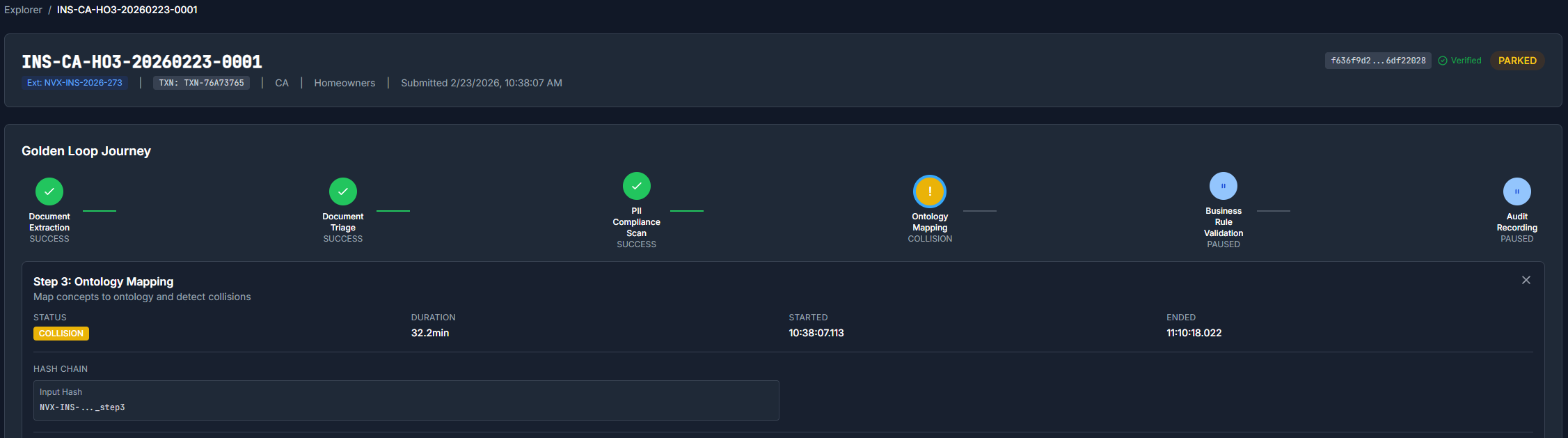
The Glass Box running a governed Koda ingestion: each pipeline step is visible in real time, from document intake through PII scanning, concept extraction, axiom generation, and collision detection.
What Happens When Things Go Wrong
Axis does not silently fail. When something goes wrong, the transaction is preserved, not lost.
Agent Failure
If your agent returns an error, times out, or produces unexpected output, the transaction is parked with its full state saved. Axis counts consecutive failures per agent. After 3 consecutive failures, the agent is auto-deactivated. The parked transaction remains visible in the dashboard for human review.
Logical Collisions
If Axis's ontology engine detects a logical contradiction in the data, for example two business rules that cannot both be true - the transaction is parked with a formal proof of the contradiction. A human analyst resolves it.
Budget Exceeded
If an orchestration exceeds its configured budget (tokens, time, cost, or step count) it stops immediately and parks. No runaway orchestrations. No surprise bills.
Transaction Retention
Parked transactions have a configurable retention window (default: 30 days). Seven days before expiration, notifications are sent to assigned analysts. After expiration, transactions are automatically archived.
Compliance Receipt
Every API response includes a compliance receipt, structured proof that all governance steps ran. PII scanning, audit trail sealing, and telemetry capture are confirmed with every single response.
"This is not a status message. It is auditable evidence that your compliance team can present to regulators."
The audit trail is powered by Novus Codex - the immutable ledger component. Each record is written to AWS S3 Object Lock WORM storage with a SHA-256 hash chain and 7-year retention. Deployable standalone or as part of Axis.
{
  "compliance_receipt": {
    "governance_coverage": "full",
    "pii_scan": {
      "executed": true,
      "findings": "CLEAN"
    },
    "audit_trail": {
      "executed": true,
      "ipfs_cid": "Qm...",
      "sealed_at": "2026-02-17T00:14:02.651Z"
    },
    "telemetry": {
      "total_tokens": 510456,
      "per_step_governance": [
        {
          "step": "classify",
          "agent": "acme-document-classifier",
          "governance_tier": "TIER_2",
          "telemetry_source": "SELF_REPORTED",
          "tokens": 12500,
          "duration_ms": 3200
        }
      ]
    }
  }
} Multi-Tenant by Design
Multiple business units, clients, or product lines can share a single Axis deployment with complete data isolation.
Isolated Data
Transactions, agents, and audit trails scoped per tenant
Tenant-Specific Rules
Drools business rule packs loaded per tenant
Configurable Retention
Per-tenant transaction retention windows
Header-Based Routing
X-Tenant-ID header on every request
CLI, SDK, and REST API
# Submit a document
axis orchestrate submit \
  --document filing.pdf \
  --manifest golden-loop

# Check status
axis orchestrate status ORQ-2026-001

# List active agents
axis agent list --status ACTIVE

# Export audit trail
axis audit export ORQ-2026-001 \
  --format json
from axis_sdk import AxisClient

client = AxisClient(
    base_url="https://axis.novus-forge.com",
    api_key="nva_...",
    tenant_id="acme-corp"
)

# Submit orchestration
result = client.orchestrate(
    document="Rate filing...",
    manifest="golden-loop"
)

# Access compliance receipt
receipt = result.compliance_receipt
print(receipt.audit_trail.ipfs_cid) Real Results from a Real Filing
Axis is not a whiteboard architecture. Here are actual metrics from processing a California HO3 homeowners filing through the Golden Loop pipeline.
The same architecture powers any domain. Insurance is the proof point. Read the full use case
See the Full Use Case
541 concepts, 550 axioms, 1 collision caught. Real metrics from a real filing
See Axis in Action
Request a demo to see how Axis brings mandatory governance to your AI agent workflows. No changes to your agents required.